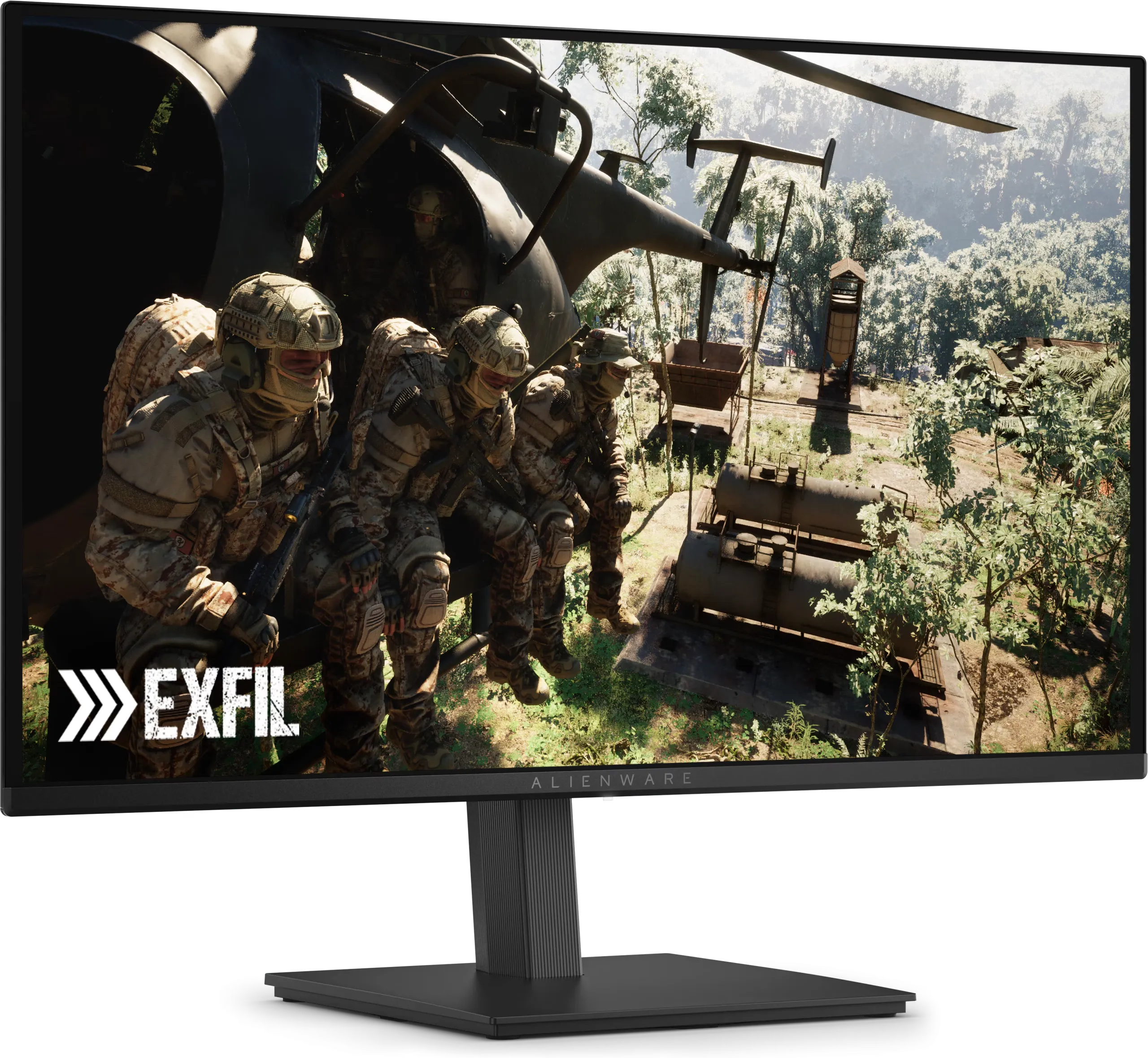
The most useful number for buying a gaming monitor this Black Friday is $349.99. That’s what Dell has charged for the Alienware AW2726DM since it launched in April: a 27-inch 1440p QD-OLED at 240 Hz, with a three-year warranty that covers burn-in. That’s its everyday price, not a sale. Today Dell sells it for $319.99.
So a 1440p OLED “deal” at $450 isn’t a deal. And the gap between a good IPS monitor and an OLED is now about $150–200, which changes what most people should buy.
Monitors are also one of the few PC categories where the memory shortage hasn’t reached US prices yet. AOC raised prices in China from August and KTC has warned of increases, but the Alienware costs less today than it did at launch. That’s the opposite of gaming laptops, where prices went up before the sales.
The prices to beat
These are target prices for each type of monitor, based on what they’ve sold for in the US this year. Brand, stand, ports and warranty all move the value up or down, so treat them as a guide, not a hard line.
| Monitor type | Who it’s for | Target price |
|---|---|---|
| 27″ 1440p, 165–180 Hz, IPS | Most PCs on a budget | Under $150 |
| 27″ 1440p, 240 Hz, OLED | Most gaming PCs: the best value this year | Under $350 |
| 27″ 1440p, 360–500 Hz, OLED | Competitive shooters, with a GPU that can reach those frame rates | Under $550 |
| 27″ 1440p, 240 Hz or more, mini-LED | Bright rooms and HDR | Under $400 |
| 27″ 4K, 144–180 Hz, IPS | Sharp text for work, consoles | Under $350 |
| 27″ 4K, 240 Hz, OLED | High-end GPUs | Under $700 |
| 32″ 4K, 240 Hz, OLED | High-end GPUs, the better size for 4K | Under $850 |
| 34″ ultrawide 1440p, 240 Hz, OLED | Racing, flight and strategy games | Under $700 |
I left out 1080p. When a 27-inch 1440p IPS monitor sells for $130, a new 1080p monitor only makes sense for esports players chasing 360 Hz or more, or on a very tight budget.
OLED or IPS?
For games, OLED wins. Each pixel makes its own light, so dark scenes are actually black, and pixel response is so fast that motion at 240 Hz looks sharper than on any IPS panel at the same refresh rate. With a graphics card like my RTX 4070 Ti Super, a 1440p 240 Hz OLED is what I’d buy.
The $150–200 extra buys three trade-offs:
- Burn-in. Static images (taskbars, spreadsheets, a game’s HUD for hundreds of hours) can leave a permanent mark. Modern OLED monitors shift pixels and refresh the panel to slow this down, but the real protection is a warranty that covers it.
- Brightness. The Alienware manages about 200 nits with a full white screen. That’s fine in a dim room, weak next to a sunny window, where a good IPS panel is brighter. A mini-LED monitor, like the TCL below, is the way around that.
- Text. The subpixel layout of OLED panels doesn’t match what Windows expects, and some people see colour fringing around small text. Newer panels are better, and it matters less at 4K.
If the monitor is mainly for eight hours a day of office work, with games in the evening, I’d buy IPS and put the difference into the graphics card. If it’s mainly for games, OLED.
Match the monitor to the graphics card
A 240 Hz monitor only shows 240 frames if your PC renders them. At 1440p, a mid-range card like an RTX 5060 Ti or RX 9060 XT can reach 100 fps or more in many games at sensible settings, which is where a high refresh rate starts to pay off (more in our 1440p graphics card guide). 4K at high frame rates needs an RTX 5070 Ti or better, or heavy use of upscaling. And 360–500 Hz is for games like Counter-Strike 2 and Valorant, where those frame rates are realistic; in a new single-player game you won’t see the difference.
For consoles, the ceiling is lower: a PS5 or Xbox Series X outputs at most 120 Hz. A 240 Hz OLED still works well, as long as it has HDMI 2.1. Over HDMI, the Alienware runs at 1440p and 120 Hz, which is everything a PS5 can send.
Four checks before you buy
- The burn-in warranty, for your exact model and country. Dell and Alienware cover burn-in for three years. MSI does on most of its QD-OLED models, LG for two years, and Samsung’s terms vary by model and region. If the listing doesn’t say “burn-in”, assume it isn’t covered.
- The HDR label. “HDR400” on an IPS or VA monitor without local dimming means it accepts an HDR signal, not that it shows HDR. The highlights can’t get brighter than the rest of the screen. For real HDR you need OLED or mini-LED.
- The ports. HDMI 2.1 for a console. DisplayPort for a PC at full refresh rate: the Alienware only reaches 240 Hz over DisplayPort. Check that your graphics card has a free one.
- The stand. Cheap monitors save money on stands that only tilt. Height adjustment matters more for daily comfort than an extra 60 Hz, and if the stand is poor, check for a 100 × 100 mm VESA mount so you can use an arm instead.
Black Friday 2026: what they cost now
Many monitors are already at their sale prices. Black Friday is November 27 and Cyber Monday is November 30, but at or under the target price, I wouldn’t wait.
| Monitor | Type | Price, date checked | Target |
|---|---|---|---|
| ASRock Phantom Gaming PG27QFT1B | 27″ 1440p 180 Hz IPS | $129, Newegg (late October) | Under $150 |
| Alienware AW2725DM | 27″ 1440p 180 Hz IPS | $199, Dell (Nov 16) | Under $150 |
| Samsung Odyssey OLED G5 (G50SF) | 27″ 1440p 180 Hz QD-OLED | $378, Amazon (Nov 16) | Under $350 |
| Alienware AW2726DM | 27″ 1440p 240 Hz QD-OLED | $319.99, Dell (Nov 16) | Under $350 |
| TCL 27P3A | 27″ 1440p 260 Hz mini-LED | $350, Amazon (Nov 16) | Under $400 |
| Acer Predator X27U F5 | 27″ 1440p 500 Hz QD-OLED | $500, Newegg (Nov 12–16) | Under $550 |
| Samsung Odyssey OLED G8 (G81SF) | 27″ 4K 240 Hz QD-OLED | $688, Best Buy and Amazon (Nov 12–16) | Under $700 |
| LG UltraGear 32GX870A | 32″ 4K 240 Hz OLED | $809.99, Amazon (Nov 12–16) | Under $850 |
| Alienware AW3425DW | 34″ 1440p ultrawide 240 Hz QD-OLED | $700, Best Buy and Amazon (Nov 12–16) | Under $700 |
Alienware AW2726DM is the one I’d buy for most gaming PCs. It’s basic: no USB hub, no HDR certification, and a simple stand. But it has the panel, the refresh rate and the three-year burn-in warranty. Today it’s $319.99 at Dell, the lowest price I’ve found for it, and at that price I wouldn’t wait for Black Friday.
Samsung Odyssey OLED G5 was $319.99 on Amazon a few days ago and is back up to $378. At that price there’s no reason to pick it over the Alienware: at 180 Hz it gives up the refresh rate that makes OLED motion so clear, and Samsung’s burn-in coverage depends on the model and where you buy it.
The two 1440p IPS monitors are the budget choice. The ASRock is the better price. The Alienware AW2725DM at $199 is only $120 cheaper than its OLED sibling, and for a gaming monitor I’d pay the difference.
TCL 27P3A is the alternative to OLED for a bright room. It’s an LCD with a mini-LED backlight split into more than 1,100 dimming zones and up to 1,200 nits of peak brightness, so HDR highlights actually stand out, and there’s no burn-in to worry about. The trade-offs: blacks aren’t as deep as on OLED, bright objects on a dark background can show a faint halo, and motion isn’t as sharp. TCL’s own store has listed it at $499.99, so $350 is a good price. For a room with a big window, it’s the one I’d pick.
Acer Predator X27U F5 at $500 is a good price for 500 Hz, but only worth it if you play competitive shooters at those frame rates.
For 4K, I’d pay the extra $120 for the 32-inch LG over the 27-inch Samsung. On a 27-inch screen, 4K is so dense that Windows has to scale everything up; at 32 inches, the extra resolution shows. The LG can also switch to 1080p at 480 Hz for shooters.
We’ll update this section with the actual Black Friday prices.
Sources: Notebookcheck on the Alienware AW2726DM (April 14, 2026), TCL on the 27P3A, Mixed on the $319.99 price (October 30, 2026), TFTCentral’s Black Friday 2026 tracker (November 16, 2026), Digital Trends on early Black Friday monitor deals (November 15, 2026), TweakTown on the ASRock PG27QFT1B, Guru3D on AOC’s price rise, Tom’s Hardware on OLED burn-in warranties.